
The role of database maintenance websites explained

Most website owners treat their database like a car they only service after it breaks down. That approach is expensive, risky, and entirely avoidable. The role of database maintenance websites goes far beyond documenting what to do when something goes wrong. These resources translate complex vendor processes, patching schedules, and security disciplines into practical guidance that administrators can actually act on. This article covers what ongoing database upkeep really involves, which best practices matter most, and how you can apply them to keep your website performing reliably and securely.
Table of Contents
- Key takeaways
- The role of database maintenance websites
- Translating vendor processes into admin guidance
- Optimisation best practices: indexing and statistics
- Database security maintenance
- Applying maintenance principles in practice
- My perspective on proactive database care
- Keep your website performing at its best
- FAQ
Key takeaways
| Point | Details |
|---|---|
| Maintenance is proactive, not reactive | Ongoing ownership covers monitoring, tuning, patching, and testing, not just incident response. |
| Fragmentation thresholds guide index work | Reorganise indexes below 30% fragmentation; rebuild above 30% to restore query performance. |
| Security requires layered, continuous effort | Critical patches should be applied within 72 hours, with quarterly access reviews to remove stale accounts. |
| Runbooks beat checklists | Documented procedures with restore drills prove your backups work rather than just confirming a job ran. |
| Maintenance model choice matters | Fully managed, fractional, and project-based models each suit different business sizes and risk tolerances. |
The role of database maintenance websites
The term “database maintenance websites” is a useful shorthand, but the industry term covering this discipline is database health management or, more formally, database reliability engineering. These are the resources, services, and documentation hubs that explain what keeping a database in good condition actually requires day to day.
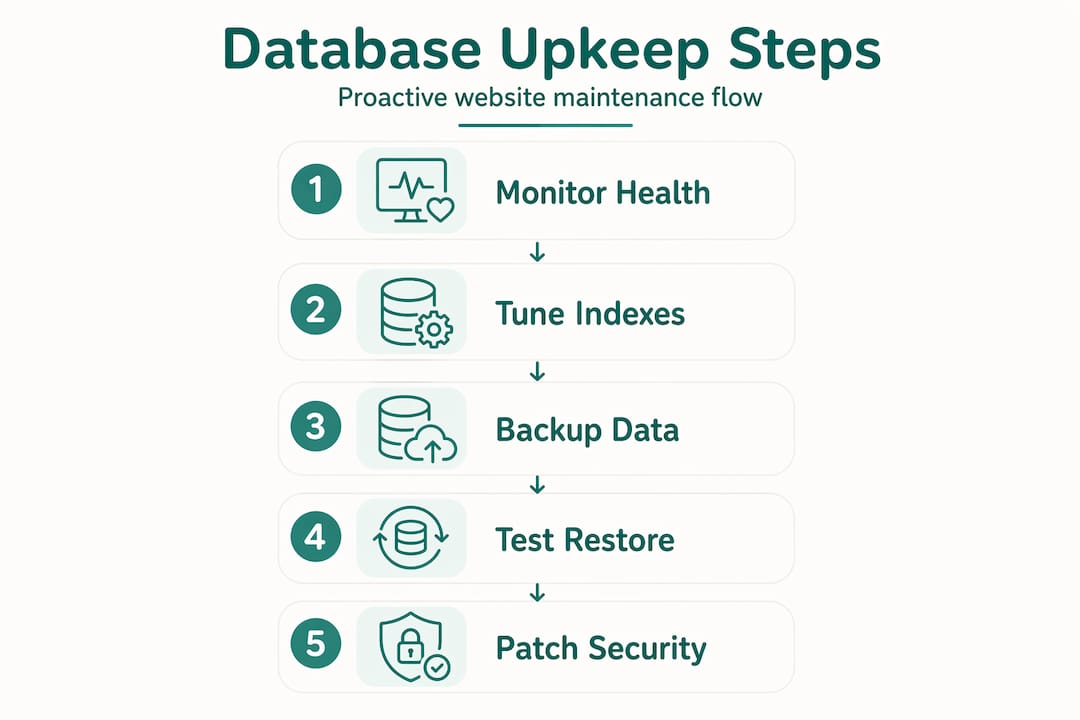
Database maintenance is a continuous process of monitoring, tuning, backup testing, patching, and security configuration. It is not simply reacting when queries slow down or a backup fails. That distinction matters enormously for website administrators, because the gap between basic cloud automation and genuine proactive care is where most performance and security problems quietly develop.
Here is what comprehensive database health management covers:
- 24x7 monitoring and alerting. Watching for query slowdowns, disk pressure, connection spikes, and replication lag before they become outages.
- Performance tuning. Identifying slow queries, adjusting indexes, reviewing execution plans, and updating statistics to keep response times consistent.
- Backup and recovery. Defining recovery-time objectives and testing restores regularly. GitLab, for example, sets a maximum recovery-time objective of 8 hours with 14 days of backup retention, combining hourly incremental and full weekly backups with continuous write-ahead log archiving.
- Security configuration. Managing access controls, enforcing encryption, running vulnerability assessments, and reviewing audit logs.
- Patching and version management. Applying vendor updates on schedule, testing in staging, and managing rollbacks when something goes wrong.
- Capacity planning. Tracking growth trends and preparing for traffic spikes before they cause problems, including cloud scaling readiness.
Pro Tip: Do not rely on your hosting provider’s automated backups as your only recovery option. Test a restore to a separate environment at least once a month to confirm the process actually works within your recovery-time objective.
Translating vendor processes into admin guidance
One of the most practical contributions database maintenance resources make is turning dense vendor documentation into something a website administrator can act on. Vendor patching schedules, maintenance windows, and rollback procedures are rarely written with small business owners in mind.
Oracle’s Autonomous AI Database, for instance, performs distributed quarterly patching with automatic rollbacks on failure. That sounds reassuring until you realise administrators still need to understand when those windows occur, what the availability implications are, and whether their applications can tolerate even a brief interruption. Maintenance resources fill that gap.
What good database maintenance guidance helps administrators manage:
- Maintenance window planning. Knowing when scheduled downtime is likely and communicating it to stakeholders in advance.
- Patch criticality classification. Understanding which patches address active vulnerabilities versus which are routine updates, so you can prioritise appropriately.
- Rollback readiness. Confirming that a tested rollback procedure exists before any patch is applied, not after something breaks.
- High-availability implications. Rolling versus non-rolling maintenance carries different downtime and data-loss implications. Administrators need to understand which applies to their environment.
The transparency this guidance provides is not just a technical nicety. It directly supports business continuity. When your team knows what to expect and when, unplanned downtime becomes a rare exception rather than a regular surprise.
Optimisation best practices: indexing and statistics
Poor index management is one of the most common causes of gradual website slowdowns. Pages that loaded in under a second six months ago now take three seconds. The database has not crashed. It has just become inefficient. Here is how to address that systematically.
- Measure fragmentation before acting. Run a fragmentation check on your indexes before scheduling any maintenance. Fragmentation below 30% warrants a reorganise operation. Above 30%, rebuild the index entirely to restore efficient data access and give the query optimiser accurate statistics.
- Update statistics after index changes. Rebuilding an index without updating statistics can cause query plan regressions. Pairing index rebuilds with statistics updates is critical, particularly in SQL Server environments.
- Schedule maintenance during low-traffic periods. Index rebuilds lock tables or consume significant I/O. Running them during off-peak hours prevents them from competing with live user requests.
- Log and verify results. Do not assume the job ran successfully because no error was thrown. Monitor fragmentation trends, log job outcomes, and track query performance before and after maintenance to confirm the work had the intended effect.
| Task | When to apply | Expected outcome |
|---|---|---|
| Index reorganise | Fragmentation 10–30% | Reduced fragmentation, minimal locking |
| Index rebuild | Fragmentation above 30% | Full defragmentation, updated statistics |
| Statistics update | After any schema or data change | Accurate query optimiser decisions |
| Fill factor review | Quarterly or after growth spikes | Stable page splits, consistent performance |
Pro Tip: If your index maintenance jobs are running but query performance is not improving, check whether statistics are being updated as part of the same job. Missing that step is the single most common reason index maintenance fails to deliver results.
Database security maintenance
Security is where database health management most often gets treated as a one-off task rather than an ongoing discipline. That is a significant mistake. Comprehensive database security testing covers authentication, privilege escalation, injection vectors, encryption, and platform-specific vulnerabilities in ways that compliance checklists simply do not capture.
The layered approach that database maintenance resources advocate looks like this:
- Prompt patching. Critical security patches should be applied within 72 hours of release. Routine patches should follow a defined schedule, typically monthly.
- Least privilege administration. Every user account, service account, and application connection should have only the permissions it needs to function. Nothing more.
- Quarterly access reviews. Quarterly reviews to remove stale accounts and revoke unnecessary privileges are foundational. Dormant accounts are a common entry point for attackers.
- Encryption at rest and in transit. Data should be encrypted in storage and across every connection, with certificates managed and renewed before expiry.
- Audit logging and anomaly monitoring. Log all privileged actions and integrate those logs with an alerting system that flags unusual patterns, such as bulk exports or off-hours access.
- Backup encryption and restore testing. Encrypted backups that have never been tested are a false sense of security. Restore drills confirm both the encryption and the recovery process work.
“Database security maintenance is a collective responsibility requiring coordination between DBA, security, infrastructure, and developers, as gaps often emerge where roles overlap.”
That last point is worth sitting with. Security failures rarely happen because one person made a catastrophic error. They happen because two teams each assumed the other was handling something.
Applying maintenance principles in practice
Understanding database maintenance strategies is only useful if you can act on them. Here is how to move from theory to a working maintenance practice, regardless of whether you manage your database in-house or through a service provider.
- Adopt a proactive mindset. Treat maintenance as a scheduled, recurring activity with defined owners. Waiting for something to break is not a strategy.
- Build operational runbooks. Runbooks with documented procedures, including preparation, execution, verification, rollback steps, and evidence logs, turn maintenance from a calendar event into a provable process.
- Prioritise critical patches. Maintain an inventory of your database instances and their patch status. An accurate instance inventory is the foundation of effective patch prioritisation.
- Monitor continuously, not occasionally. Set up alerting for query performance, disk usage, connection counts, and failed jobs. Review those alerts on a defined schedule.
- Choose the right maintenance model. Fully managed database optimisation services suit businesses without in-house database expertise. Fractional DBA support works well for growing teams that need occasional specialist input. Project-based engagements are appropriate for migrations or major version upgrades.
Pro Tip: Before choosing a maintenance model, document what your current database health looks like. Note your slowest queries, your last successful restore test, and your patch currency. That baseline makes every conversation with a service provider far more productive.
My perspective on proactive database care
I have worked with enough small business websites to know that database problems almost never announce themselves clearly. What you see is a contact form that takes four seconds to submit, or a product search that times out under load. By the time those symptoms appear, the underlying issue has usually been building for weeks.

What I have learnt is that the role of proactive database care is not glamorous, but it is the difference between a website that quietly keeps working and one that surprises you at the worst possible moment. The businesses I see struggle most are those that treat their database as infrastructure someone else is responsible for. Even if you use a managed hosting provider, understanding what is and is not covered in your plan changes how you approach maintenance.
Maintenance resources and documentation hubs are genuinely useful for translating what vendors do automatically into what you still need to own. Security maintenance, in particular, gets overlooked far too often. Encryption and access controls feel like solved problems until a quarterly review reveals a former employee’s account still has write access to your customer database.
My practical advice: start with a restore test and a privilege audit. Those two tasks alone will tell you more about your database’s actual health than any monitoring dashboard.
— Scott
Keep your website performing at its best
If the importance of database maintenance has highlighted gaps in how your website is currently managed, you are not alone. Most small business websites are built well and then left to drift. At Offandonwebdesign, we work with small businesses to build and maintain websites that stay fast, secure, and effective over time, not just on launch day.

Whether you need a new website built from the ground up or want to understand why your existing site is underperforming, Offandonwebdesign offers transparent, contract-free support tailored to your needs. From SEO management to technical website health, our team handles the details so you can focus on running your business. Take a look at our service pricing to find the right level of support for where you are right now.
FAQ
What does database maintenance actually include?
Database maintenance covers monitoring, performance tuning, index management, backup testing, security patching, and access control reviews. It is an ongoing ownership process, not just reactive incident response.
How often should database indexes be maintained?
Index maintenance frequency depends on your write volume and fragmentation rates. As a general rule, check fragmentation weekly and schedule rebuilds or reorganisations based on whether fragmentation is above or below the 30% threshold.
Why is security patching time-sensitive?
Critical vulnerabilities can be exploited within hours of public disclosure. Applying critical patches within 72 hours significantly reduces the window of exposure and is considered a baseline standard for responsible database security management.
What is a recovery-time objective and why does it matter?
A recovery-time objective (RTO) defines the maximum acceptable time to restore your database after a failure. Without a defined RTO and regular restore testing, you have no reliable way to know whether your backups will actually protect your business when needed.
Do managed hosting providers handle all database maintenance?
Not entirely. Cloud automation handles infrastructure but typically leaves optimisation, recovery testing, and security configuration to the customer. Understanding what your provider covers, and what they do not, is the starting point for any sound maintenance strategy.